
Validating message templates using SerilogAnalyzer

A few years ago, I switched my logging framework of choice to Serilog, a structured logging framework.

To use structured logging, you use a concept called ‘message templates’. The are a simple DSL extending .NET form strings. It looks a little bit like string interpolation, but with more power.

A quick example copied from the Serilog website:

The stored message will be a combination of the message template with the placeholders and the properties captured in JSON format:

The only problem is that similar to string.format and  in contrast to string interpolation, the compiler doesn’t give any warnings when the provided message template is incorrect or any of the parameters is missing.

Time to introduce SerilogAnalyzer, a Roslyn-based analysis for code using the Serilog logging library. It checks for common mistakes and usages problems.

A must have if you are using Serilog today! Download the Visual Studio Extension here: https://github.com/Suchiman/SerilogAnalyzer/releases
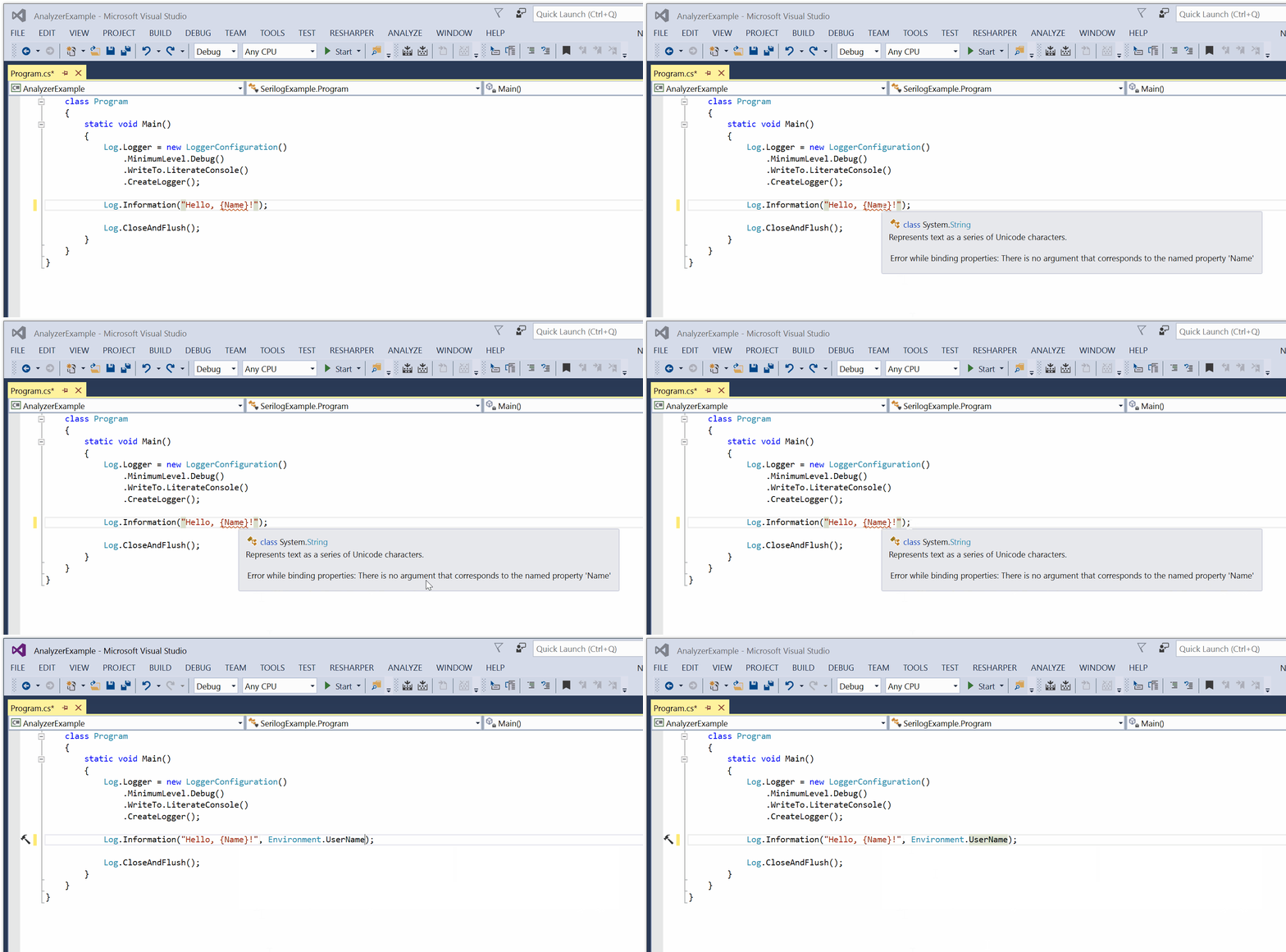
SerilogAnalyzer

Popular posts from this blog

Podman– Command execution failed with exit code 125

After updating WSL on one of the developer machines, Podman failed to work. When we took a look through Podman Desktop, we noticed that Podman had stopped running and returned the following error message: Error: Command execution failed with exit code 125 Here are the steps we tried to fix the issue: We started by running podman info to get some extra details on what could be wrong: >podman info OS: windows/amd64 provider: wsl version: 5.3.1 Cannot connect to Podman. Please verify your connection to the Linux system using `podman system connection list`, or try `podman machine init` and `podman machine start` to manage a new Linux VM Error: unable to connect to Podman socket: failed to connect: dial tcp 127.0.0.1:2655: connectex: No connection could be made because the target machine actively refused it. That makes sense as the podman VM was not running. Let’s check the VM: >podman machine list NAME         ...

Azure DevOps/ GitHub emoji

I’m really bad at remembering emoji’s. So here is cheat sheet with all emoji’s that can be used in tools that support the github emoji markdown markup: All credits go to rcaviers who created this list.

VS Code Planning mode

After the introduction of Plan mode in Visual Studio , it now also found its way into VS Code. Planning mode, or as I like to call it 'Hannibal mode', extends GitHub Copilot's Agent Mode capabilities to handle larger, multi-step coding tasks with a structured approach. Instead of jumping straight into code generation, Planning mode creates a detailed execution plan. If you want more details, have a look at my previous post . Putting plan mode into action VS Code takes a different approach compared to Visual Studio when using plan mode. Instead of a configuration setting that you can activate but have limited control over, planning is available as a separate chat mode/agent: I like this approach better than how Visual Studio does it as you have explicit control when plan mode is activated. Instead of immediately diving into execution, the plan agent creates a plan and asks some follow up questions: You can further edit the plan by clicking on ‘Open in Editor’: ...