If you can’t wait until Microsoft releases ASP.NET MVC 4 (which includes bundling and minification out-of-the-box), I have good news for you. Microsoft released early bits of this feature in the Microsoft.Web.Optimization NuGet Package. This package adds support for easy minification and bundling of text-based (js, css, etc) files to your ASP.NET (MVC) web applications. The tool works by adding routes and rules to how and what it should bundle and minify.
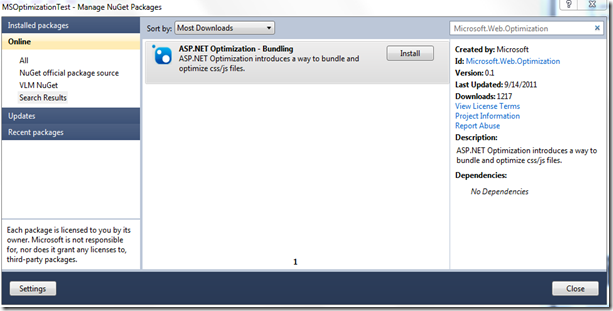
After installing the package, add the following code to Application_Start in Global.asax
BundleTable.Bundles.ResolveBundleUrl() creates an hash based on the combined files. This ensures that while combining and minifying css you're not creating caching issues that often occur when doing these kinds of optimizations.
Now you can replace your existing css with this:
This will result in one file with minified css being sent to the client.
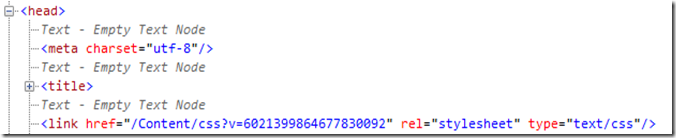
This works thanks to the EnableDefaultBundles(). Calling this method add routes for /css and /js. The default rule look for all .css files in the directory and combines and minifies them before sending the result to the client. The exact same thing also works with ~/Scripts/js which would combine and minify all our .js files in the ~/Scripts directory.
How to use it?
Download and install the Microsoft.Web.Optimization package using NuGet.
After installing the package, add the following code to Application_Start in Global.asax
BundleTable.Bundles.EnableDefaultBundles();
BundleTable.Bundles.ResolveBundleUrl() creates an hash based on the combined files. This ensures that while combining and minifying css you're not creating caching issues that often occur when doing these kinds of optimizations.
Now you can replace your existing css with this:
<link href="@BundleTable.Bundles.ResolveBundleUrl("~/Content/css")" rel="stylesheet" type="text/css" />
This will result in one file with minified css being sent to the client.

This works thanks to the EnableDefaultBundles(). Calling this method add routes for /css and /js. The default rule look for all .css files in the directory and combines and minifies them before sending the result to the client. The exact same thing also works with ~/Scripts/js which would combine and minify all our .js files in the ~/Scripts directory.