NSubstitute Roslyn Analyzers

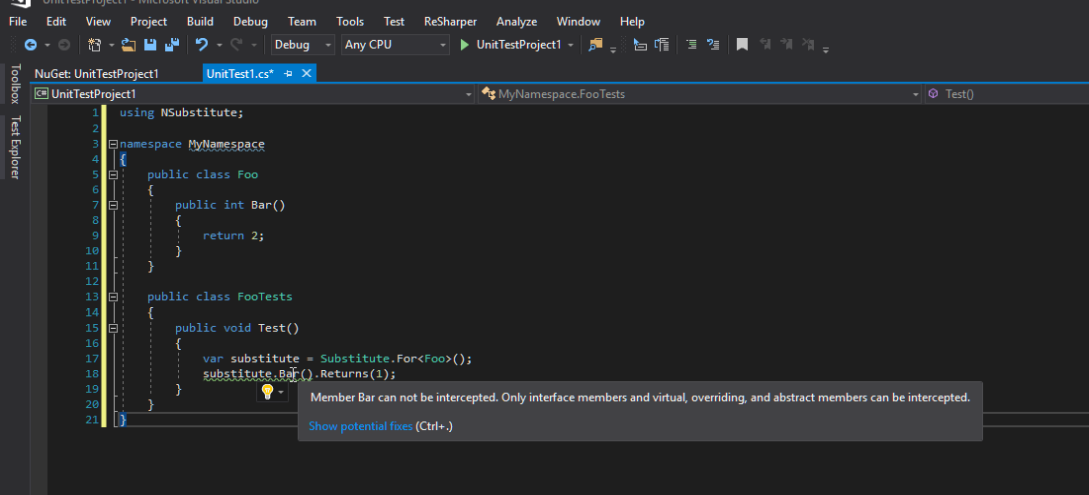
Quick tip if you are using NSubstitute (like me) as your mocking library. Certainly don’t forget to include the NSubstitute Roslyn analyzers as well.

This allows you to detect some cases where NSubstitute will fail at runtime (e.g. when you attempt to mock non-virtual members).

For the full list of rules that are validated, take a look at the documentation:

https://github.com/nsubstitute/NSubstitute.Analyzers/tree/master/documentation

Popular posts from this blog

Podman– Command execution failed with exit code 125

After updating WSL on one of the developer machines, Podman failed to work. When we took a look through Podman Desktop, we noticed that Podman had stopped running and returned the following error message: Error: Command execution failed with exit code 125 Here are the steps we tried to fix the issue: We started by running podman info to get some extra details on what could be wrong: >podman info OS: windows/amd64 provider: wsl version: 5.3.1 Cannot connect to Podman. Please verify your connection to the Linux system using `podman system connection list`, or try `podman machine init` and `podman machine start` to manage a new Linux VM Error: unable to connect to Podman socket: failed to connect: dial tcp 127.0.0.1:2655: connectex: No connection could be made because the target machine actively refused it. That makes sense as the podman VM was not running. Let’s check the VM: >podman machine list NAME         ...

Azure DevOps/ GitHub emoji

I’m really bad at remembering emoji’s. So here is cheat sheet with all emoji’s that can be used in tools that support the github emoji markdown markup: All credits go to rcaviers who created this list.

Cleaner switch expressions with pattern matching in C#

Ever find yourself mapping multiple string values to the same result? Being a C# developer for a long time, I sometimes forget that the C# has evolved so I still dare to chain case labels or reach for a dictionary. Of course with pattern matching this is no longer necessary. With pattern matching, you can express things inline, declaratively, and with zero repetition. A small example I was working on a small script that should invoke different actions depending on the environment. As our developers were using different variations for the same environment e.g.  "tst" alongside "test" , "prd" alongside "prod" .  We asked to streamline this a long time ago, but as these things happen, we still see variations in the wild. This brought me to the following code that is a perfect example for pattern matching: The or keyword here is a logical pattern combinator , not a boolean operator. It matches if either of the specified pattern...